From Switch-Case to Signals: My Journey Building a GTK Calculator in C
I have been brushing up my C concepts through The C language course by PyjamaBrah. In one of the sections, Piyush showed a basic CLI calculator that used a switch-case to evaluate the result of two operands and an operator.
Here’s what it looked like:
scanf("%f", &input1);
scanf("%f", &input1);
scanf("%c", &op);
switch (op){
	case '-':
		....
	case '+':
		...
	case '*':
		...
	case '/':
		...
}
Of course, this was just meant to demonstrate switch.
So ..
- No input validation (wrong input? crash.)
- And definitely no support for full expressions like
3 + 5 * 2 - Only decimal and floating point calculations
That got me thinking: how big is the gap between this and a basic GUI calculator?
Goals: What I Wanted My Calculator to Do
Before diving into code, I set some ground rules. My calculator should:
- Handle full expressions using BODMAS
- Gracefully handle invalid inputs
- Have a working GUI
- Be modular enough to add new operators easily in the future
Expressions, RPN & Shunting Yard
If you look up how calculators handle expression parsing, you’ll quickly run into a few terms:
- Infix (e.g.,
3 - 5 / 2) — what humans use - Postfix aka Reverse Polish Notation (RPN) (e.g.,
3 5 2 / -) — what computers prefer - Shunting Yard Algorithm — invented by Dijkstra, used to convert infix to postfix
Why postfix? Because it lets you evaluate expressions without worrying about parentheses or operator precedence — you just process the tokens left to right using a stack.
If you’ve never heard of this, this video explains it well. Comp Sci in 5: Shunting Yard Algorithm - YouTube
Structs, Enums, and Stacks — Building the Engine
To implement all this in C, I needed to mimic:
- A stack for operators
- A queue for output
- And a way to represent both operands and operators using
enum+struct
Here’s the rough structure of the core:
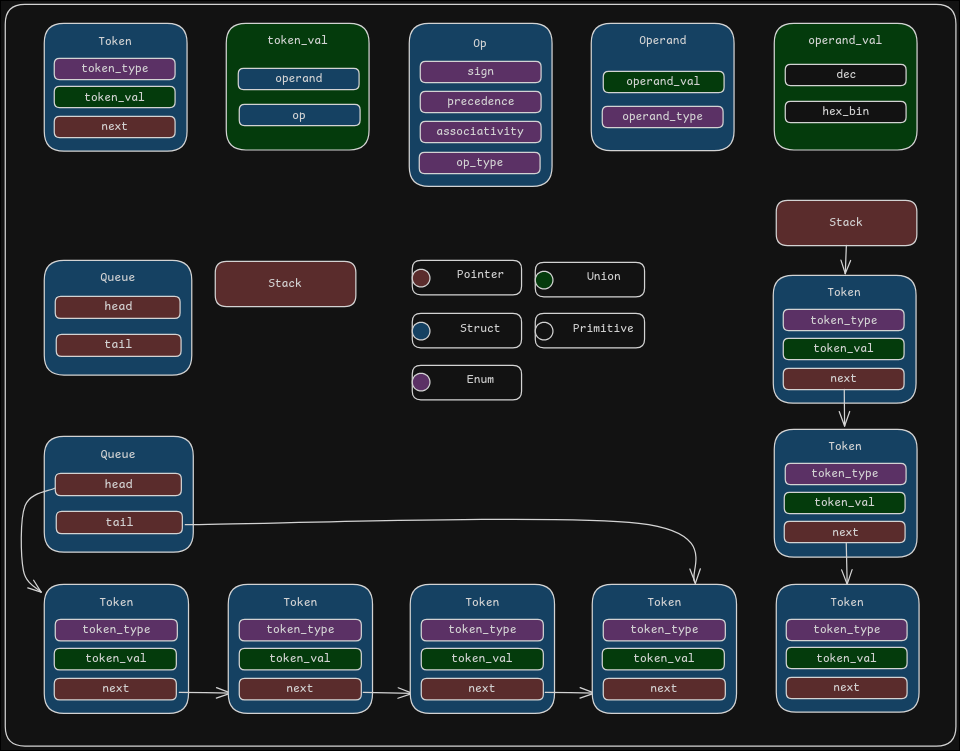
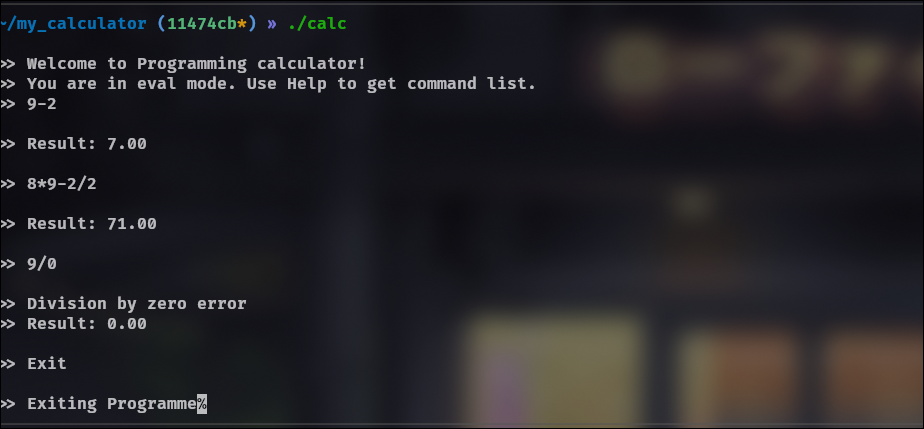
With the tokenizer, RPN creator, and evaluator in place, I now had a CLI-based calculator that could handle proper math expressions.
Here's the first working version:
Next Step: A GUI
I’ve never built GUI apps before, but I wanted something that felt “real.” I checked how GNOME Calculator worked and saw it used GTK. That seemed like a good path to follow.
So I installed GTK and started playing around.
Designing the UI: Glade to the Rescue
GTK lets you build UIs in two ways:
- Manually create widgets in C
- Use a UI definition file (
.ui) written in XML
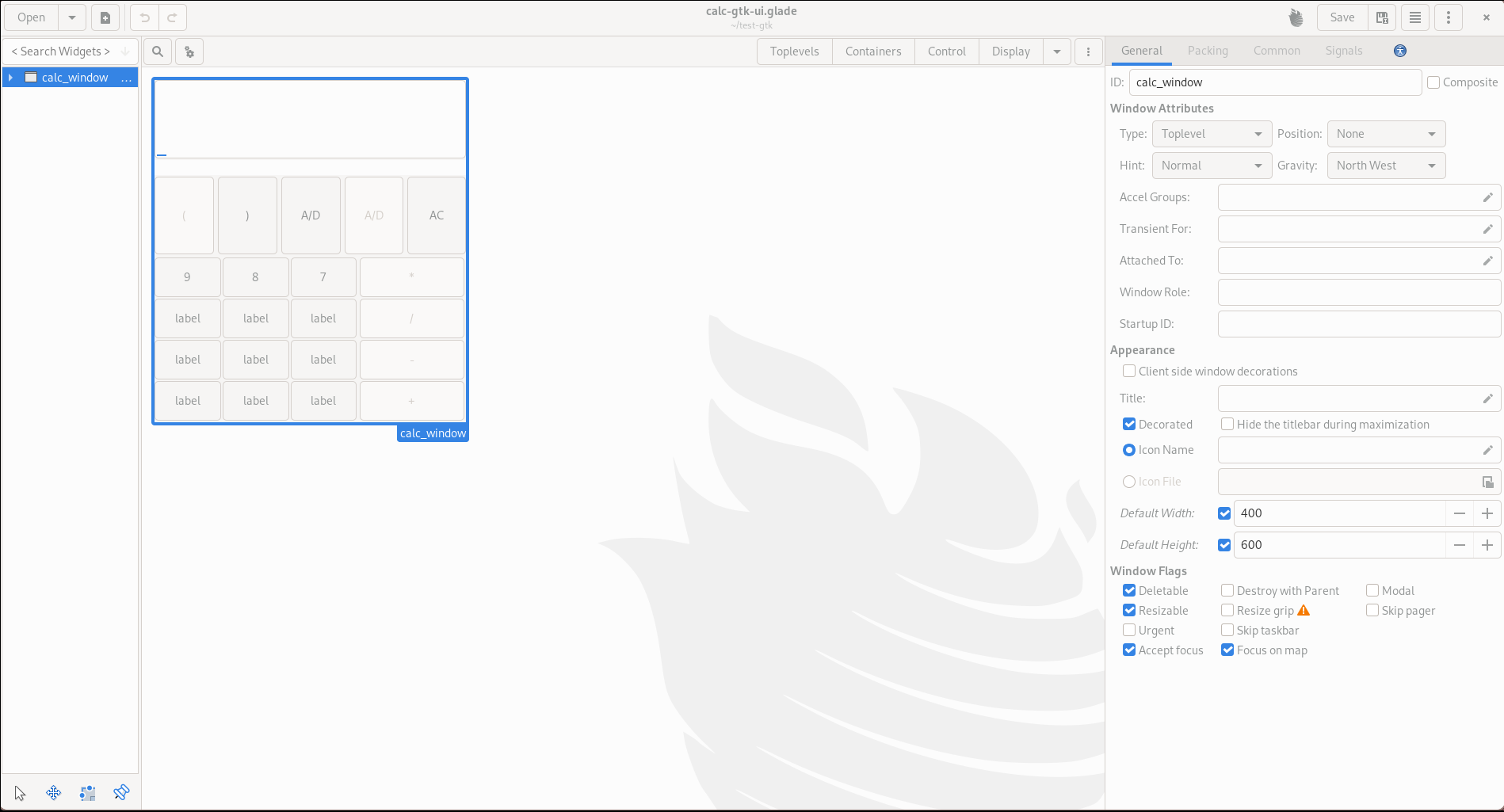
Even a simple calculator UI can get bloated fast. Creating each button and setting its properties in C would be a nightmare. So I used Glade — a drag-and-drop GUI builder that outputs ui.glade files for GTK.
Here’s what the initial UI skeleton looked like:
Connecting Logic to UI
Once the layout was ready, I had to:
- Load the
.uifile usingGtkBuilder - Connect buttons and keyboard inputs to callback functions
- Wire up input/output using
GtkEntryandGtkTextView
At this point, the UI was interactive but didn't actually evaluate anything.
Hooking Up the Backend
Now came the cool part: plug the CLI logic into the GUI.
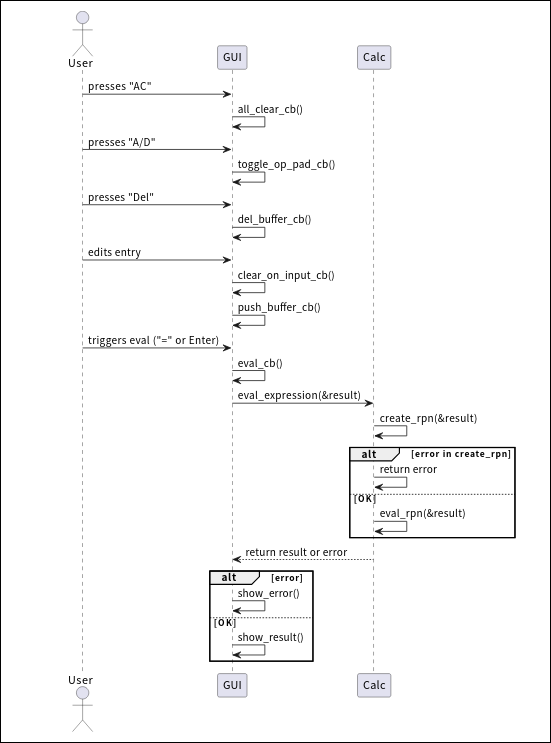
Instead of reading from stdin, the evaluator now takes input from the GtkEntry when the user presses = or hits Enter. If the input is valid, we show the result in the same entry. If it’s not, the error goes to a GtkTextView.
Everything else stayed pretty much the same — just more visual.
Final Overview
Here’s how the calculator works under the hood:
What I Learned
- You can mimic OOP's concepts using structs, function pointers and opaque types.
- Even though frameworks like GTK abstract away large part of GUI development, it's still complicated due to how elements interact with each other.
- Spending some time to setup debug logs, and build automation (makefile/Cmake) saves a ton of time in long run.
- Valgrind makes Segfualts feel less painful.
Possible Next Steps
- Add expression history
- Fix memory leaks that I ignored
For anyone interested here's link to source code